
Back
Updated at: July 12, 2026
Best Web Design Tools: From Idea to Launch
Modern web design is no longer just about creating pretty mockups. In today’s world, it’s a full ecosystem of interconnected tools that support the entire workflow — from the first idea to handoff and launch. The right toolset can dramatically improve your productivity, whether you're a freelancer, a small studio, or part of a large product team.
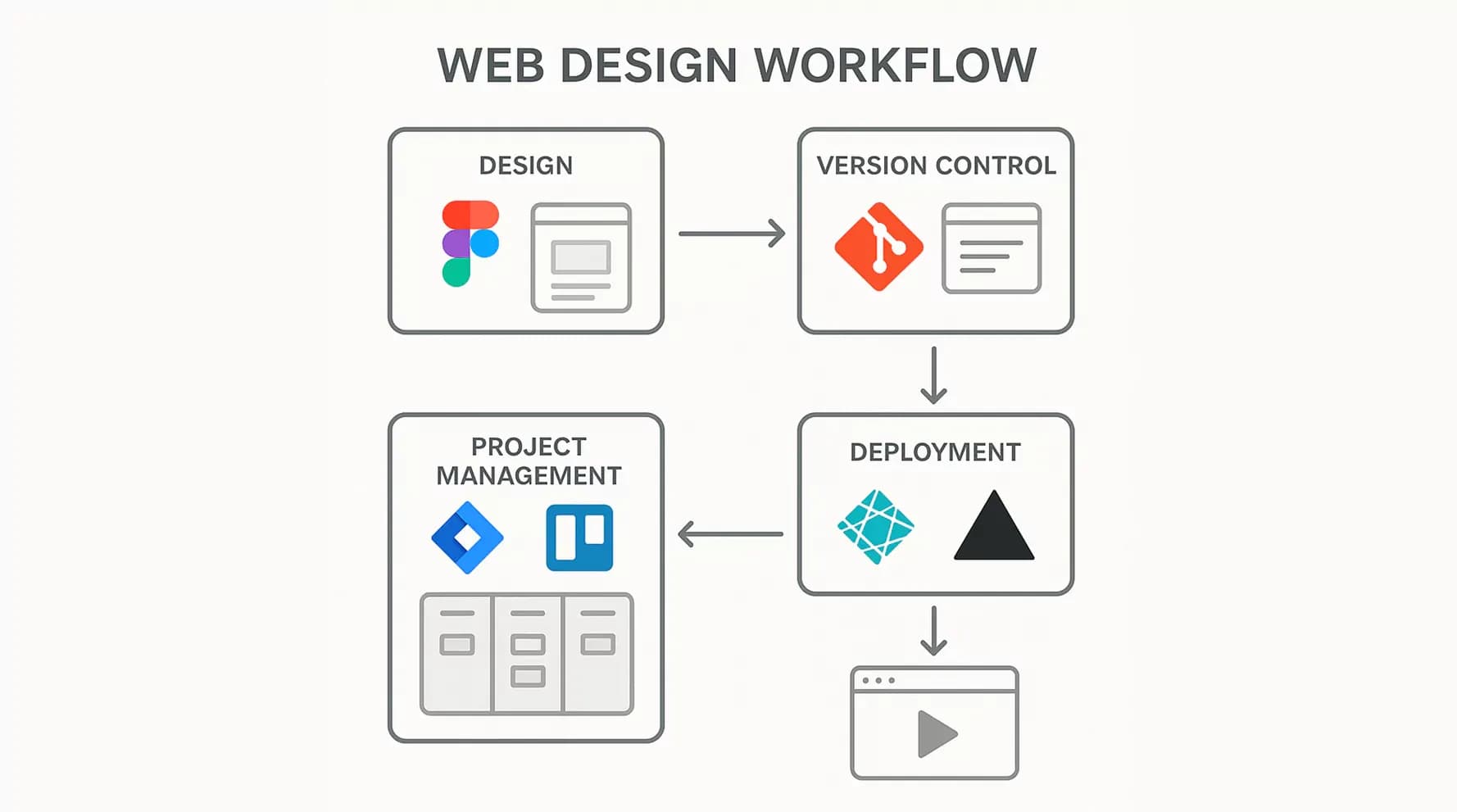
Who This Guide Is For
- Freelancers: Discover tools for building great-looking projects quickly and collaborating with clients on a tight budget.
- Small studios (2–5 people): Learn how to streamline teamwork and build consistent design systems.
- Product teams: Get insights into setting up scalable workflows for iterative development.
- Agencies: Explore tools for managing complex, multi-stakeholder projects with high branding demands.
Trends That Shape Web Design in 2025
This year brought major changes:
- AI-assisted design has become a standard — automating repetitive tasks and generating content.
- Microinteractions and scroll-triggered effects require advanced prototyping tools.
- Collaborative design went from “nice-to-have” to essential: teams are remote, clients expect real-time visibility, and the handoff between design and development is now a critical success factor.
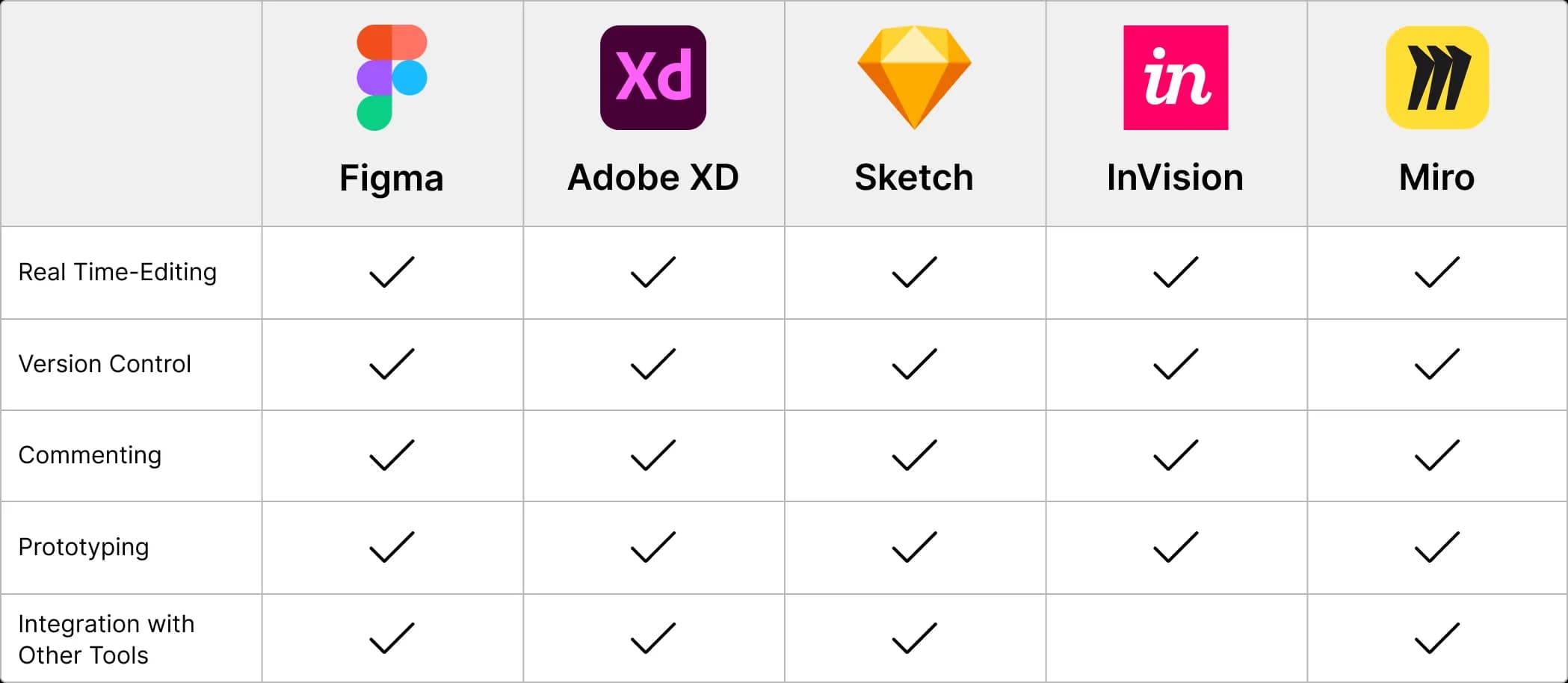
Comparison of WEB Design Tools
Team collaborations features
Core Design Tools to Know
1. Figma — The All-in-One Design Platform
Best for: All team types, from solo designers to enterprise
Figma remains the centerpiece of modern design workflows. In 2025, it expanded its AI capabilities and introduced Figma Sites — letting you publish simple websites directly from your designs.
Key features:
- Real-time collaborative editing
- Component system and design tokens
- Dev Mode for smooth handoff
- AI-powered content and layout suggestions
- Integrations with 200+ tools
Pricing (2025): Free (3 files), Pro — $12/mo, Org — $45/mo (up ~20% from 2024)
Use Case: Airbnb’s design team uses Figma to coordinate over 50 designers globally with a unified system of 400+ components.
2. Framer vs Webflow — The Best Site Builders
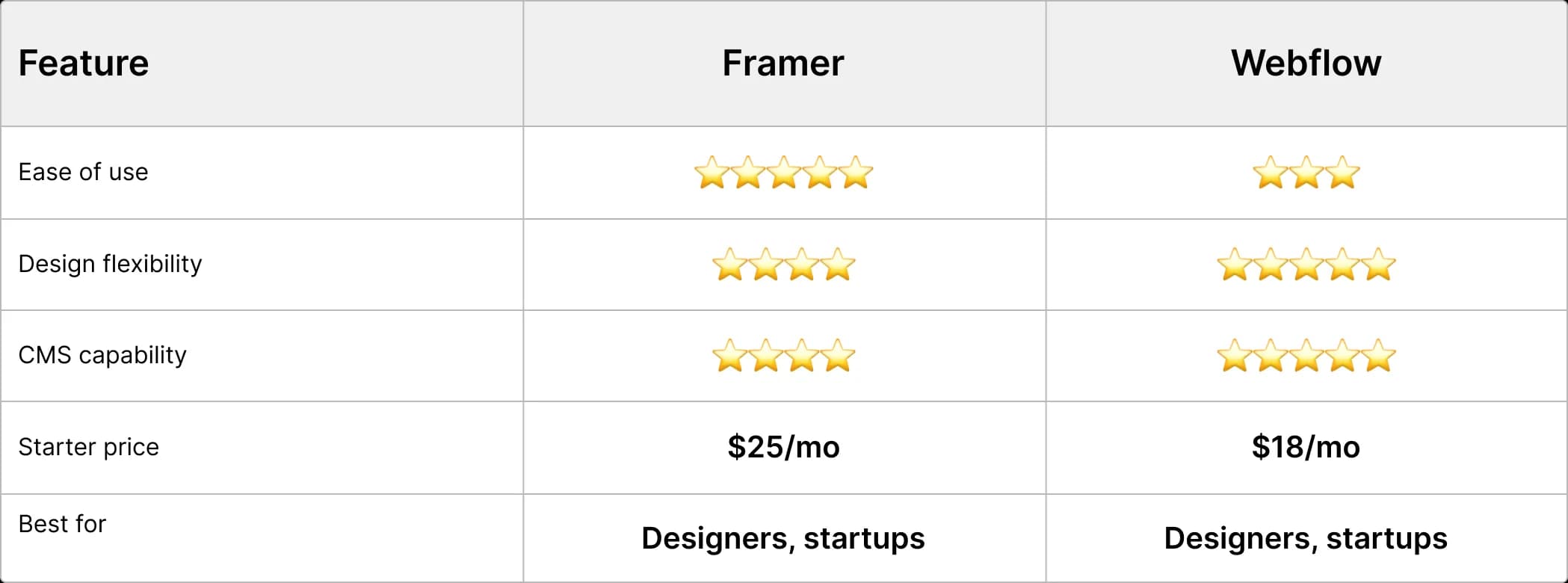
- Framer is perfect for designers who want total control from layout to live website. It offers a Figma-like interface and powerful no-code animations.
- Webflow is better for developers and complex projects. It offers deeper code access, advanced SEO tools, and enterprise-level features.
Comparison by key parameters:
How to choose:
- Use Framer for portfolios, landing pages, MVPs
- Choose Webflow for full-scale websites with integrations or multilingual content
3. Advanced Animation & Interaction Tools
ProtoPie (macOS + Windows) beats Principle (macOS-only) in versatility, offering logic-based interactions, sensor/voice support, and real-world simulations.
When to use:
- Present complex UI flows
- Test UX scenarios
- Deliver animation specs to developers
Pricing: ProtoPie Pro — $25/mo, Enterprise — $89/mo; Principle — $99 (one-time)
4. AI Tools: Your New Design Assistant
- Relume revolutionizes wireframing and sitemap creation — generate structure in minutes
- Midjourney + ChatGPT help create illustrations and content
- Microsoft Designer offers free AI-based social media visuals
Workflow tip:
Relume → Figma → ChatGPT (content) → Midjourney (images)
5. Documentation & Design Systems
Choose based on team size:
- Notion: for small teams (under 10 people)
- Zeroheight: for mid-size design systems
- Supernova: for enterprise with advanced analytics
Real-world case: Shopify’s design team reduced onboarding time from 2 weeks to 3 days after switching from Confluence to Zeroheight.
6. Project Management: From Idea to Execution
Best options by team size:
- Trello — freelancers and micro-teams ($5/mo)
- Linear — product teams of 5–50 ($8/mo)
- Jira — enterprise teams with complex workflows ($7.75/mo)
Bonus: Linear integrates with Figma to show design status directly in files.
7. Time Tracking & Billing
Toggl remains the go-to for time tracking, now with AI task classification and smart project tagging.
Pricing: Free (up to 5 users), Starter — $9/mo, Premium — $18/mo
Alternatives: RescueTime (auto-tracking), Clockify (budget-friendly for teams)
8. LottieFiles: The New Animation Standard
Lottie replaces GIFs for interactive and lightweight animations. Works across web, iOS, Android, React, and more.
New in 2025:
- AI-generated animations from static images
- Interactive Lottie animations with user input
Budget Planning: Free vs Paid Tools
Suggested stacks:
|
User Type |
Recommended Tools |
Monthly Cost |
|
Student/Beginner |
Figma Free, Trello, Canva |
$0 |
|
Freelancer |
Figma Pro, Framer, Toggl |
~$50 |
|
Small Studio |
Figma Team, Linear, Notion |
~$200–400 |
|
Product Team |
Full stack (Figma + Linear + ProtoPie + Docs etc.) |
~$1000–3000 |
Design Handoff: From Pixel to Code
Modern handoff is no longer just “send the Figma file.” In 2025, the process is more structured and seamless.
Best Practices:
- Figma Dev Mode — auto-generate CSS
- Zeroheight — sync design tokens/documentation
- ProtoPie — export interaction specs
- Linear + GitHub — track development status
Handoff Checklist:
- Components have all states (hover, active, disabled)
- Responsive breakpoints documented
- Animations with easing and durations
- Assets exported in correct formats (@1x, @2x, SVG)
- Interactive prototype accessible
Workflow Templates: From Idea to Launch
Landing Page Workflow:
- Relume → sitemap & structure (30 min)
- Figma → layout & components (4–8 hrs)
- Framer → live site with animation (2–4 hrs)
- Notion → documentation for client (1 hr)
Web App Workflow:
- Figma → research & system design (2–4 weeks)
- ProtoPie → interactive prototypes (1 week)
- Linear → sprint planning
- Zeroheight → system documentation
- Webflow/Code → development & launch
Conclusion: The Future of Web Design Is Now
2025 marked a turning point in digital design:
- AI tools automate repetitive tasks
- No-code platforms empower designers to publish real sites
- Collaboration tools drive success for distributed teams
Final Takeaways:
- Choose tools by purpose, not popularity — freelancers need fewer tools than enterprise teams
- Invest in process, not just software — a well-documented Figma handoff saves more time than a new plugin
- AI assists, doesn’t replace — let Relume, ChatGPT, and Midjourney speed up your work, but keep the creativity yours
- Scale smart — start with essentials and grow your stack as your needs evolve
Modern web design is a creative and technical symbiosis. The right tools free you to focus on what matters: solving real problems through meaningful digital experiences.
Summary:
The landscape of web design has evolved into a comprehensive ecosystem of tools that enhance productivity throughout the design process, from concept to launch. This guide caters to various user groups, including freelancers, small studios, product teams, and agencies, providing insights into effective tool selection and workflow optimization. Recent trends emphasize the importance of AI-assisted design, collaborative tools, and advanced prototyping capabilities, which have become essential in modern workflows. Figma is highlighted as a central platform, offering features that facilitate real-time collaboration and design handoff. Site builders like Framer and Webflow cater to different needs, with Framer focusing on design control and Webflow offering deeper code access for complex projects. Advanced tools such as ProtoPie enhance animation and interaction capabilities, while AI tools streamline wireframing and content creation processes. Documentation and project management tools are recommended based on team size to ensure efficient workflows. Time tracking tools like Toggl and animation standards like LottieFiles are also integral to modern design practices. The handoff process has become more structured, emphasizing the need for comprehensive documentation and communication between design and development teams. Ultimately, the future of web design emphasizes the importance of choosing the right tools and processes to foster creativity and solve real-world problems effectively.
Read also:



webdesigntools
figma
framer
webflow
protopie
notion
zeroheight
supernova
aiindesign
relume
chatgpt
midjourney
toggl
lottiefiles
uidesign
uxdesign
productdesign
freelancetools
designworkflow
designsystems
projectmanagement
frontendhandoff
nocodetools
collaborativedesign
designtips
webdesigntrends
digitalproductdesign
designstack
designprocess
interfaceanimation
designforstartups


Head Office: We Develop IT
LLC 1191 Lula Ln
Franklin, TN 37064
Services
Process
Portfolio
Testimonials and Team
Awards and Trends
Blog and news


